Built around your plan
WavePlan turns listening into a plan — annotate the waveform, verify with meters and analyzers, and walk into your DAW knowing exactly what to do next.
The plan starts on the timeline
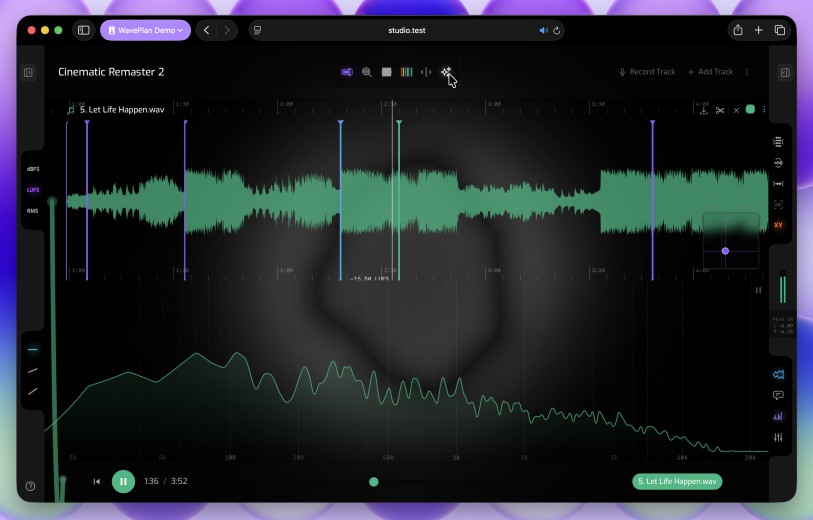
WavePlan’s timeline is where listening becomes a plan. Mark the moments that matter, write down what to do at each one, and carry the plan straight into your session.
Annotate the waveform
Drop markers and notes directly onto the waveform — catch every break, flag every fix, and build an ordered list of moves while the track plays.
Markers your DAW can read
WavePlan reads and writes DAW-readable file markers — your plan round-trips into the session instead of living on a sticky note.
Plans that travel with your projects
Plans live in your account and can ride along with your DAW projects through WaveDrive — open the file anywhere, and the plan comes with it.
Verify what you hear
Eyes and ears together — WavePlan’s measurement components show you what the audio is doing, and every one of them takes annotations so observations become part of the plan.
Frequency analyzer
Watch the spectrum as the track plays and mark problem regions — muddy low-mids, harsh highs, sub that disappears on small speakers.
Metering you can trust
Check loudness and peaks against your targets, annotate what you find, and run limiter stress tests against your references before you commit in the DAW.
Mixer with A/B comparison
Level-match your mix against commercial references and flip between them instantly — honest comparisons, no loudness illusions.
References that follow you
Your reference library lives in your account — commercial releases, shared workspaces and your own material, ready to audition anywhere you open WavePlan.
Instant references, anywhere
Pull up any reference in seconds — no bouncing, no transferring, no hunting through folders. It’s in your library, so it’s always at hand.
Sync with WaveDrive, or upload directly
Point WavePlan at your WaveDrive reference library and it stays in step — or upload files straight into WavePlan when that’s simpler.
Shared workspaces
Plan together — share a workspace with collaborators so annotations, references and ideas land in one place everyone can see.
The WaveDrive File Browser, in your browser
Click WaveDrive in the WavePlan navigation and you’re looking at your entire file library from any browser — every synced project file, every uploaded reference, every bounce. Browse, search, upload, download and organise without leaving WavePlan.
One library, two sources
Files synced by WaveDrive from your Mac sit alongside files you upload directly to WavePlan — same browser, same search, same tools. One unified view of everything in your account.
Search, filter and preview
Real-time search across your entire library. Switch between list and grid view, filter by folder type, and preview audio without downloading a thing.
Upload, download and organise
Drag and drop new files straight into your library. Download any file or batch to your machine. Rename, move between folder types, and keep everything tidy — all from the browser.
Restore from the web, syncs to your Mac
Walk through any file’s version history right in the browser. Pick a checkpoint, restore it, and the change syncs back to every Mac running WaveDrive — no app-switching required.
Ready to plan your next mix? Create a free account and start planning today.
WavePlan
Seamlessly integrates mix planning, waveform annotation and reference checking.
WaveDrive comes with your WavePlan subscription. WavePlan & WaveDrive work hand-in-hand — sync and back up your DAW projects, annotate audio files by DAW project, and plan mixes and masters. WavePlan is great for exploring emerging ideas and igniting creative sparks.